Why Wi-Fi Struggles Upstairs and How to Improve It
Struggling with wifi weak upstairs? Learn effective solutions to boost your Wi-Fi signal and improve connectivity in this step-by-step guide.
Noticing strong internet downstairs but slow loading and buffering above? This guide explains why that happens and gives a practical, step-by-step path to fix it. Many homes face a simple duo of causes: distance from the router and physical obstacles that absorb the signal.

We start with free changes you can try today, then move to affordable upgrades if needed. The goal is stable whole-home performance, not just more bars on your device. That steady connection matters for video calls, streaming, and everyday work.
On this page you’ll find clear causes, no-cost troubleshooting advice, and hardware options like extenders, mesh systems, and wired fixes. The best solution depends on your house layout, router placement, and what floors or walls are made of, so we focus on diagnosis before you spend money.
Key Takeaways
- Distance and building materials are the main reasons for a poor signal upstairs.
- Try simple, free fixes first to see if the connection improves.
- Stable performance matters more than signal bars for calls and gaming.
- If needed, consider extenders, mesh, or wired alternatives as upgrades.
- The right fix depends on your home layout and router location.
Why Wi-Fi Signals Get Weaker Upstairs in a Typical Home
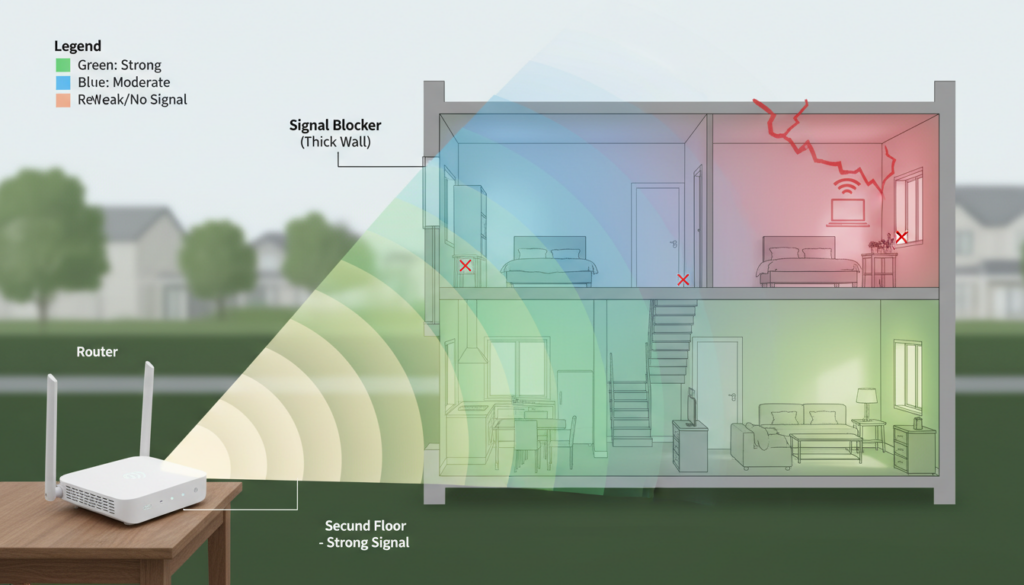
Many homes see slower connections on upper floors because the router’s reach is limited by layout and materials.
Distance lowers the signal and cuts real-world speed. Each floor or thick wall reduces range, so devices farther from the router get fewer megabits.
Building materials and furniture absorb signals. Cabinets, concrete, and metal cause bigger drops than drywall. Electronics on the same bands add interference and hurt network performance.
What Else Would You Like to Know?
Choose below:
- Move the router central: Putting the router toward the house center reduces the number of floors and walls between it and devices.
- Open and elevated: Keep the router out of cabinets and on a shelf so signals travel upward through the floor framing.
- Separate electronics: Increase space from microwaves, cordless phones, and baby monitors that compete on 2.4 GHz.
- Run a health check: Update firmware, reboot on schedule, and confirm basic settings for stable performance.
- Choose the right band: 2.4 GHz offers better range; 5 GHz gives higher speed. Band steering helps devices pick the best band automatically.
| Check | What to test | Quick result |
|---|---|---|
| Placement | Speed test near router vs another room | Big gap = coverage issue |
| Interference | Move competing devices 3–6 ft away | Improved signal = interference |
| Health | Firmware and reboot schedule | Fixes instability and slowdowns |
| Bandwidth | Test during peak vs off-peak | Slow only at peak = internet/bandwidth issue |
If central, open, and elevated placement plus interference reduction do not help, consider hardware upgrades next.
Best Hardware Upgrades to Boost Upstairs Wi-Fi Coverage and Connection Quality
If simple placement and settings do not help, select a hardware path that fits your home and budget.
Extenders and repeaters — budget choice
Extenders receive and rebroadcast your signal to a farther floor or room.
They can be cheap and quick to deploy. Expect lower peak speed because the extender shares wireless capacity with the main router. Some units create a separate network name and do not roam well.
Mesh systems — seamless roaming and consistent performance
Mesh uses multiple nodes under one network name. That creates smoother roaming and fewer dead spots.
Place nodes so their coverage zones overlap. This spacing gives better real-world performance than a single extender across floors.
Wired backhaul, MoCA and powerline
Wired backhaul is the best way to cut wireless congestion. Run Ethernet between nodes or APs when possible for top speed and stability.
MoCA adapters use existing coax to carry the network; RG6 is ideal but RG59 can still help on older coax runs. Pair MoCA with an upstairs access point for fast, reliable links.
Powerline + access point is a practical alternative when coax or Ethernet is unavailable. Results depend on household electrical wiring and circuit layout.
- Choose an extender for a single room need.
- Pick mesh for whole-home coverage across multiple floors.
- Use MoCA or wired backhaul for best performance.
- Use powerline when wiring options are limited.
Conclusion
Begin by testing placement and interference; hardware is the next step if problems persist. The main causes of weak wifi upstairs are distance, floor and wall materials, and competing electronics. Each maps to a practical fix.
Start free: move and elevate the router, reduce interference, and update firmware. If one room still has poor performance, an extender is a cost‑effective option.
For whole‑home reliability: choose a mesh system or use wired backhaul (Ethernet or MoCA) for the best connection and lower variability.
Validate results with repeat tests from the same device and spot. Pick an option, implement it, and contact ISP or manufacturer support if wiring or firmware issues block the solution.
FAQ
Why does my Wi-Fi signal get weaker on the upper floor?
How do floors and building materials affect wireless performance upstairs?
Can household electronics interfere with my network?
Will moving my router improve coverage for the whole house?
Should I place the router in a cabinet or behind furniture?
Is elevation important for getting better connectivity upstairs?
How can I reduce interference from competing 2.4 GHz devices?
How do firmware updates and a router health check help?
When should I use 2.4 GHz versus 5 GHz bands?
How can I tell if the problem is coverage versus slow internet bandwidth?
Are extenders or repeaters a good budget option for upstairs coverage?
What are the benefits of a mesh Wi-Fi system for multi-floor homes?
How does a wired backhaul improve upstairs speed?
What are MoCA adapters and when should I use them?
Can powerline networking help if I don’t have coax or Ethernet upstairs?
Which hardware upgrade should I choose first for better upstairs coverage?
Do branded products like Netgear Orbi, Eero, or TP-Link Deco make a difference?
Apartment Wi-Fi Problems: What Makes Signal and Speed Worse
» See exclusive tips for your home